Printed tables
For spreadsheet screenshots, scanned reports, receipts, and photographed printed tables.
POST /api/v1/image-to-excel1 credit per successful jobEndpoint docs
Convert images to Excel with the IMG2Excel API. Upload a screenshot, scanned table, receipt, invoice, spreadsheet photo, or handwritten record, then extract rows and columns into an editable XLSX file. Automate table conversion in your app or existing workflow.
Turn printed or handwritten table images into editable Excel files with a simple API workflow.
Choose the printed-table or handwriting endpoint for your image. Both follow the same upload, status check, and XLSX download workflow.
Retry an upload with the same idempotency key to retrieve the original job. Keep your integration from creating duplicate conversions when a request is interrupted.
Keep your API key on your server and revoke it from your account when needed. Download results through signed links that expire after 15 minutes.
curl --fail-with-body --max-time 330 -X POST https://img2excel.net/api/v1/image-to-excel \
  -H "Authorization: Bearer $IMG2EXCEL_API_KEY" \
  -H "Idempotency-Key: invoice-import-001" \
  -F "[email protected]"
curl --fail-with-body --max-time 330 -X POST https://img2excel.net/api/v1/image-to-excel \
-H "Authorization: Bearer $IMG2EXCEL_API_KEY" \
-H "Idempotency-Key: invoice-import-001" \
-F "[email protected]"status: succeeded
result.download_url
secure URL · 15 min
Explore screenshots, financial tables, inventory sheets, and handwritten records alongside their spreadsheet results.
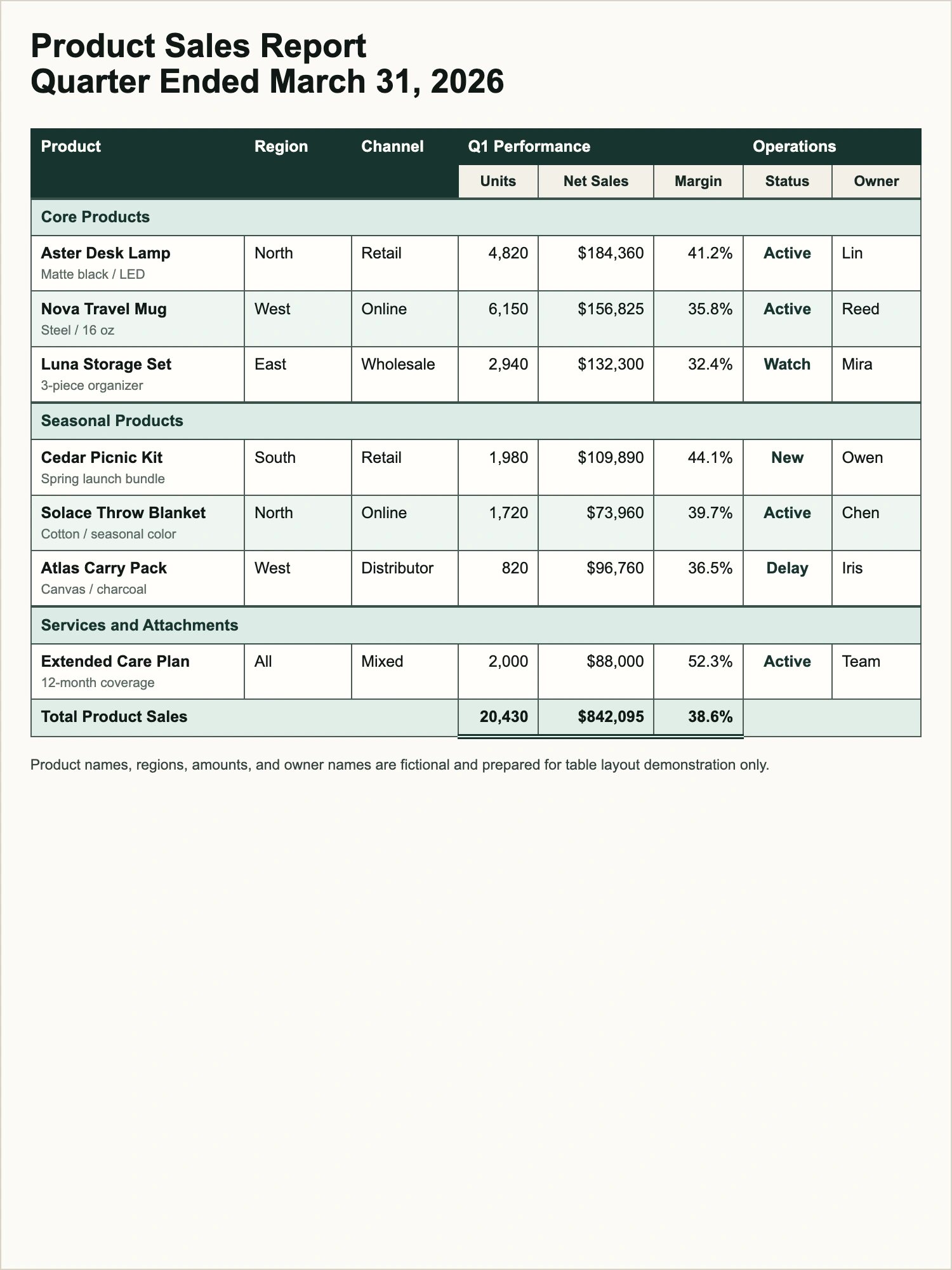
For spreadsheet screenshots, scanned reports, receipts, and photographed printed tables.
POST /api/v1/image-to-excelFor clear photos or scans of handwritten logs, forms, and records arranged in rows and columns.
POST /api/v1/handwriting-to-excelCreate an API key in your account, then upload a PNG or JPG table image to the printed or handwriting endpoint from your backend.
Include your Bearer API key and a stable idempotency key. The synchronous endpoint returns the completed job and its download URL.
Wait for the synchronous request to finish while IMG2Excel extracts the table into an editable workbook.
A successful response includes result.download_url. Asynchronous jobs and pending retries can also be checked through the job status endpoint.
Download the workbook from the signed URL, then open, edit, sort, and analyze the extracted data in Excel, Google Sheets, or Numbers.
Download links expire after 15 minutes. Retrieve the job again for a fresh link while the result is within its 24-hour retention window.
One API, many pipelines
Build table extraction into the software your team already uses, from internal tools to high-volume document workflows.
Turn photographed invoices, statements, and reconciliation tables into editable workbooks.
Add table extraction to upload portals, inbox automations, and back-office queues.
Digitize tables from field notes, archival scans, worksheets, and handwritten records.
Extract sales reports, inventory tables, and spreadsheet screenshots into editable data for recurring analysis and reporting.
Connect table conversion to your internal tools and replace repetitive typing with an upload, status check, and workbook download.
Turn photographed stock logs, attendance sheets, and handwritten records into organized workbooks your team can review and share.
Frequently asked questions
Find answers about API access, table extraction, credits, and downloading your Excel results before building your integration.
The IMG2Excel API turns screenshots, scanned tables, spreadsheet photos, and handwritten records into editable XLSX workbooks. Use it to add table extraction to your app, internal tools, or document workflows without manually retyping rows and columns.
Purchase a Business or Professional credit package, create an API key in your account settings, and send your first table image from your backend. The recommended synchronous API waits for conversion and returns a download URL for the completed workbook. Optional asynchronous endpoints return a job ID for status checks.
Both endpoints accept one PNG, JPG, or JPEG image per request, up to 4MB. For a screenshot, scan, or photo, keep the full table visible and make sure the text is readable.
Yes. Use the Handwriting to Excel endpoint for handwritten stock logs, field notes, forms, and other records arranged in rows and columns. Use the Image to Excel endpoint for printed tables, scanned reports, and spreadsheet screenshots.
A successful printed-table conversion costs 1 credit, and a successful handwriting conversion costs 2 credits. API jobs use the same account credits as your other supported tools. Failed conversions do not consume credits.
The recommended synchronous endpoint keeps the request open until conversion completes and returns 200 OK with the workbook download link. Set your client timeout to 330 seconds. For background processing, use the optional /jobs endpoint and poll its status.
Submit each image as a separate conversion job and track it using its own job ID. Your integration can queue uploads for larger workflows. If you receive a rate or concurrency limit response, respect Retry-After when provided and retry with backoff.
Send a stable Idempotency-Key for each logical upload. Reuse that key when retrying the same request on the same account and endpoint to retrieve the original job instead of creating another conversion.
Result files are retained for 24 hours. Each signed download link expires after 15 minutes. If the link expires within the retention window, retrieve the job again to get a fresh link and save the workbook to your own storage.
Yes. The API returns a standard XLSX workbook that you can open and edit in Microsoft Excel, Google Sheets, or Numbers. Review important figures, dates, and recognized text before using the data in reports or downstream workflows.
Make API requests from your backend and keep the key out of browser-side JavaScript and public repositories. New keys are stored encrypted and can be revealed from your API settings. You can revoke a key from your account settings when it is no longer needed.
Crop the image to the table, keep every row and column visible, and use a sharp, evenly lit photo or scan. For handwritten records, keep the camera parallel to the page and avoid shadows or cut-off borders. Review the output when the source is faint or difficult to read.
Yes. The API documentation includes Copy Markdown and Copy to AI actions, AI integration guidance in the quickstart, plain-text documentation, and an OpenAPI 3.1 specification. Use these resources to help your coding assistant build authentication, synchronous conversion, optional polling, and workbook downloads.

API access is included with Business ($14.99) and Professional credit packages. Create a key and ship your first integration today.